Guide: Creating a C++ Extension for Falkon Browser
This guide walks through creating a basic “Hello World” plugin in falkon.
1. Project Structure
Create a dedicated directory for your extension at src/plugins/HelloWorld/. You must include these four files to build a functional plugin:
-
helloworld.json: The Identity Card. It provides plugin info (name, author, icon) to the browser UI. -
helloworld.h: The Contract. It defines the class structure and the “hooks” the browser uses to talk to your code. -
helloworld.cpp: The Logic. This is the “brain” where your actual C++ code lives. -
CMakeLists.txt: The Blueprint. It tells the compiler how to turn your text files into a machine-readable plugin.
2.helloworld.json
This file allows Falkon to display your plugin in the “Extensions” menu without actually running any C++ code. This keeps the browser fast because it only “looks” at the plugin without “loading” it.
JSON
{
  "Name": "Hello World Plugin",
  "Comment": "Minimal Hello World plugin for Falkon",
  "Icon": "configure",
  "X-Falkon-Settings": "true",
  "X-Falkon-Version": "0.1.7"
}-
X-Falkon-Settings: Setting this totruetells Falkon to enable the “Settings” button in the preferences window. -
Icon: Uses standard system icon names (e.g.,configureorpreferences-system).
3.helloworld.h
In C++, inheriting from PluginInterface is a promise. You are promising the browser that your class has specific functions like init() and unload().
CPP
#ifndef HELLOWORLD_H
#define HELLOWORLD_H

#include "plugininterface.h"
#include <QMessageBox>

class HelloWorld : public QObject, public PluginInterface
{
    Q_OBJECT
    Q_INTERFACES(PluginInterface)
    // Links the JSON metadata to this header
    Q_PLUGIN_METADATA(IID "Falkon.Browser.plugin.HelloWorld" FILE "helloworld.json")

public:
    explicit HelloWorld();

    // Mandatory hooks the browser calls
    void init(InitState state, const QString &settingsPath) override;
    void unload() override;
    bool testPlugin() override;
    void showSettings(QWidget *parent) override;
};

#endif-
Q_INTERFACES: Acts as a “handshake” that allows the browser to safely cast your code into a plugin it can use. -
IID: A unique ID for your plugin. If two plugins have the same IID, the browser will refuse to load the second one.
4.helloworld.cpp
This is where the actual action happens. When you enable the plugin, the init() function runs.
CPP
#include "helloworld.h"
#include "../config.h"
#include <QDebug>

HelloWorld::HelloWorld() : QObject() {}

void HelloWorld::init(InitState state, const QString &settingsPath) {
    Q_UNUSED(state)
    Q_UNUSED(settingsPath)

    // Prints a message to the terminal for debugging
    qDebug() << QStringLiteral("Hello World from Falkon plugin!");
}

void HelloWorld::unload() {
    // Logic to clean up when the plugin is disabled
}

bool HelloWorld::testPlugin() {
    // Safety check: only load if the plugin matches the browser version
    return (QString::fromLatin1(Qz::VERSION) == QLatin1String(FALKON_VERSION));
}

void HelloWorld::showSettings(QWidget *parent) {
    // Shows a popup message when the 'Settings' button is clicked
    QMessageBox::information(parent, tr("Hello"), tr("Hello World from Falkon!"));
}-
testPlugin(): Crucial for stability. It prevents the browser from crashing if your plugin was built for a different version of Falkon. -
QStringLiteral: A memory-efficient way to handle text in C++ that avoids unnecessary copies.
5.CMakeLists.txt
This file tells the CMake build system how to compile your source files into a Shared Object (.so) file.
CMake
set(HelloWorld_SRCS helloworld.cpp helloworld.h)

# Handles UI translations automatically
ecm_create_qm_loader(HelloWorld_SRCS falkon_helloworld_qt)

# Build as a MODULE (a dynamically loadable plugin)
add_library(HelloWorld MODULE ${HelloWorld_SRCS})

# Link your plugin to the main Falkon library
target_link_libraries(HelloWorld FalkonPrivate)

# Install the finished .so file to the plugins directory
install(TARGETS HelloWorld DESTINATION ${FALKON_INSTALL_PLUGINDIR})MODULE: Tells the compiler this code is meant to be plugged into another app at runtime, not run as a standalone program.
6. Compiling and Running
-
Register the plugin: Add
add_subdirectory(HelloWorld)to the bottom ofsrc/plugins/CMakeLists.txt. -
Build:
cd ~/falkon/build cmake -DCMAKE_INSTALL_PREFIX=./install -DQUICK_INSTALL=ON .. make -j$(nproc) install -
Set the Environment: You must tell your OS where the new plugin is, or it will only look in system folders (like
/usr/lib).export FALKON_PREFIX=$HOME/falkon/build/install export XDG_DATA_DIRS="$FALKON_PREFIX/share:$XDG_DATA_DIRS" export QT_PLUGIN_PATH="$FALKON_PREFIX/lib/plugins:$QT_PLUGIN_PATH" # Launch Falkon $FALKON_PREFIX/bin/falkon -
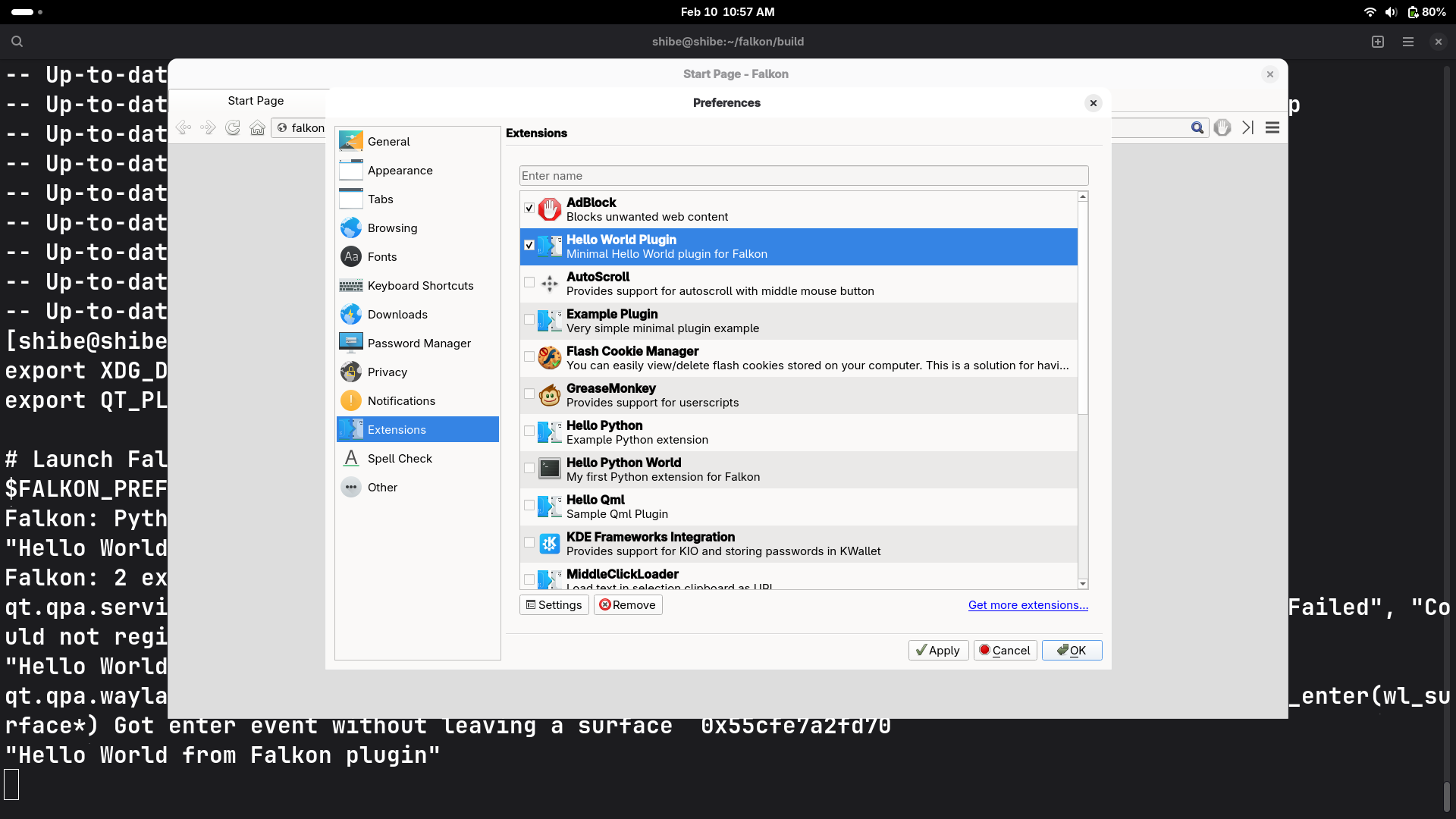
Activate: Open Falkon, go to Preferences > Extensions, and check the box for Hello World Plugin
-
Look at your output